Reproducible Research Computing

PSTAT 234 (Fall 2025)

Sang-Yun Oh

University of California, Santa Barbara

Reproducibility Crisis

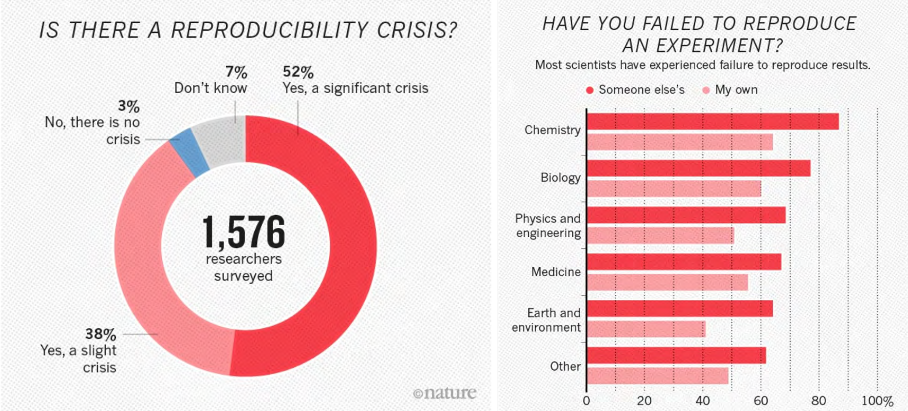
Reproducibility Crisis in Sciences (Baker 2016)

Computational Reproducibility

According to National Academies of Sciences et al. (2019) report:

  • Reproducibility is obtaining consistent results using the same input data; computational steps, methods, and code; and conditions of analysis: i.e., computational reproducibility.

  • Replicability is obtaining consistent results across studies aimed at answering the same scientific question, each of which has obtained its own data.

Even attaining computational reproduciblity is challenging (Pineau 2018; Crane 2018).

Reproducibility Pyramid

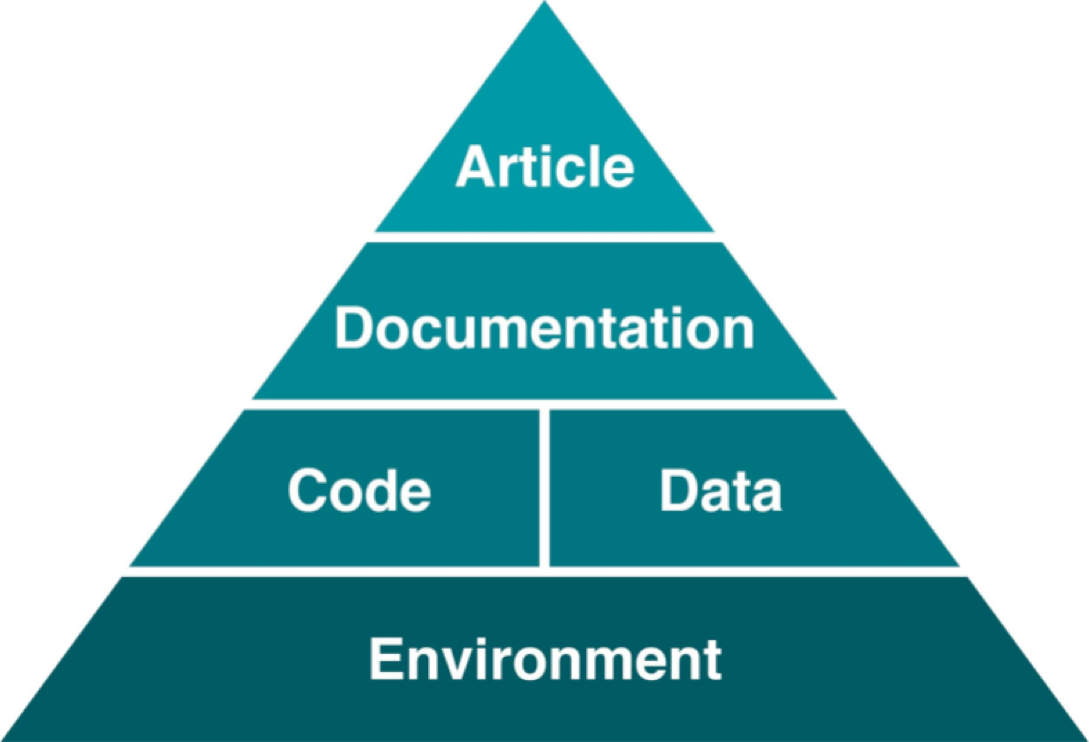
Computational environment forms the foundation of reproducibility pyramid (Steeves 2017).

Computational Environments

  • Consists of infrastructure, system, and packages

    • Infrastructure is the computer (physical or virtual).
    • System is the operating system (Windows, MacOS, etc.).
    • Packages are the software libraries (Python, R, etc.).
  • Software installations can be challenging

    • Software may depend on hardware (CPU, GPU, etc.).
    • Software packages often depend on other software packages.
      (Tensorflow has 47 dependencies).
    • Dependencies may conflict with each other.

How do we create a stable computational environment?

Reproducible Challenges

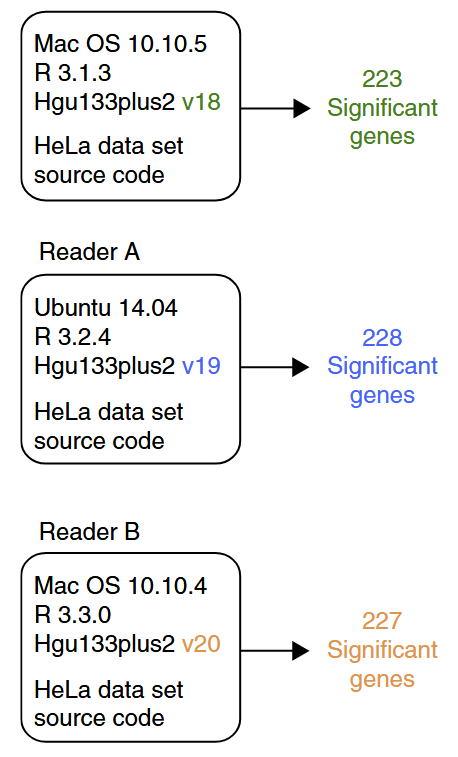
Beaulieu-Jones and Greene (2017)

Many factors may affect computational reproducibility and are often outside the researchers’ area of expertise.

  • Random number generator: e.g., simulating data and random weights
  • Software versions: e.g., gene annotations in bioinformatics
  • Hardware (CPU, GPU): e.g., floating point calculation
  • Compilers: e.g., optimization levels in C/C++

Cloud Computing Technology can help!
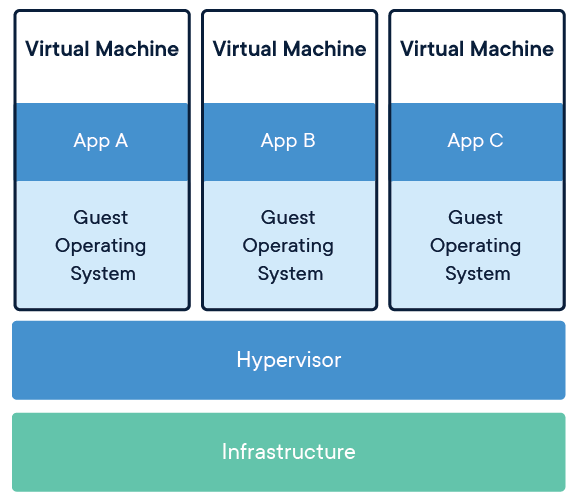
Virtual machines (image source: Wikimedia Commons)

  • Cloud computing platforms standardize infrastructure.
  • Many “virtual machines” can run on a single physical computer.
  • Virtualization allows whole systems to be stored as files.
  • Reproducibility solved? Not quite…

Reproducibility Challenges Remain

Challenges with virtual machines:

  • Heavyweight: multi-GB images, hard to share/version
  • Slow: full hardware virtualization adds overhead
  • Complex: all configs computers have
    (e.g., memory, storage, networking)
  • Brittle: OS updates can break environments
  • Version control: Poor fit with Git & CI/CD (binary blobs, no diffing)

Hard to integrate into modern collaborative workflows

Virtualization Technologies

Modern computing tools can isolate computational environments.

  • Virtual Machines (VMs): full emulation of a computer
  • Containers: lightweight, isolated environments on a shared OS
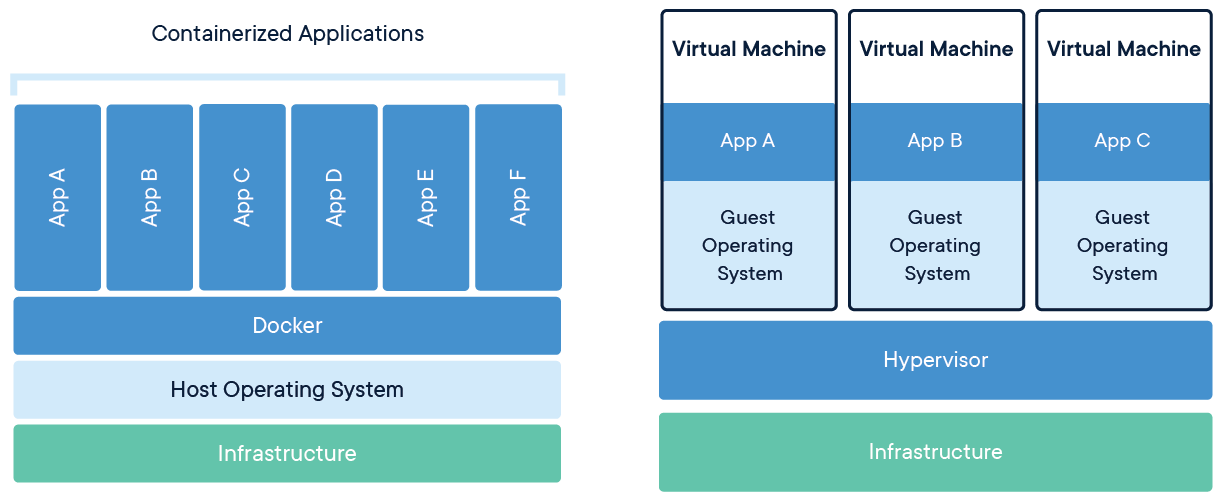
Containers (left) vs. virtual machines (right) (image source: Wikimedia Commons)

Bioinformatics Example
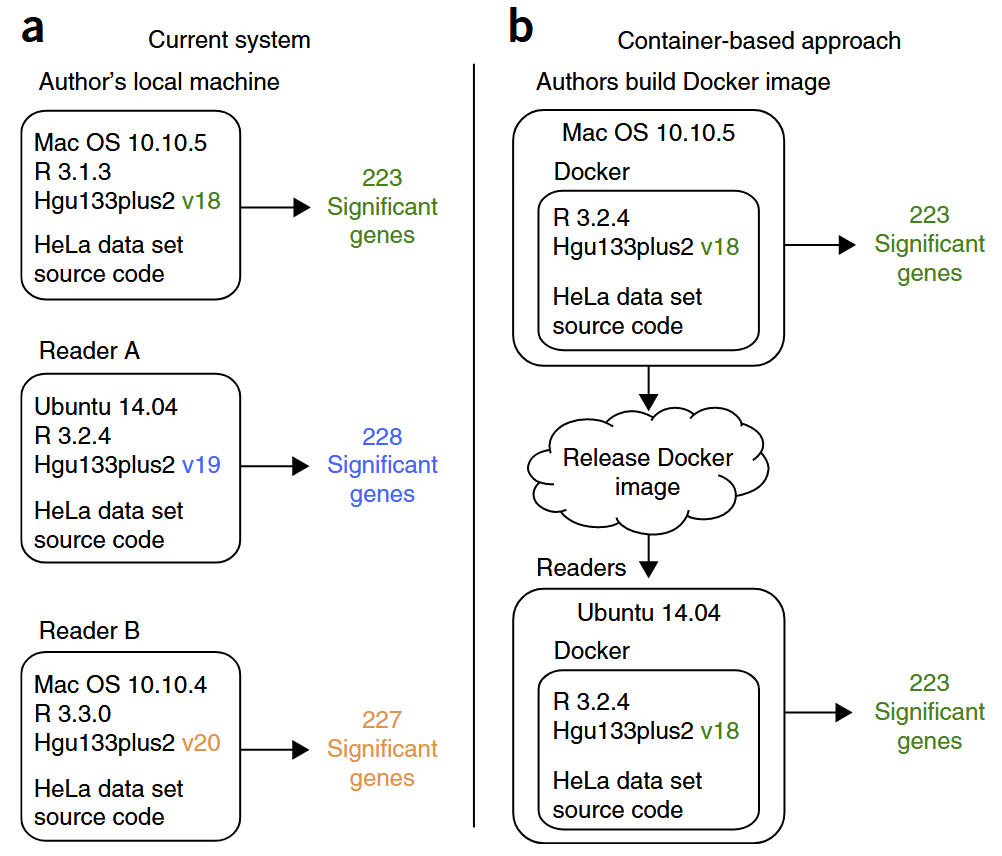
Beaulieu-Jones and Greene (2017)

Containerized Computational Environment

Containers are lightweight, isolated environments that can be shared easily.

  • Container definitions are stored in a text file (e.g., Dockerfile).
  • Dockerfile (or Containerfile) can be version controlled.
  • As open standard, multiple container engines exist
  • Containers are supported by all cloud platforms.
  • Most popular: Docker, Podman, Singularity/Apptainer
  • Software publishers often provide container images for their software.
  • Container images can be extended.

Publicly Available Containers

  • Many pre-built containers are available for common tasks.
  • Using ready-to-use containers can save time and effort.
  • These containers can be easily customized for specific needs.

Example containers:

Container URL Notes
docker.io/ubuntu:22.04 Official Ubuntu 22.04 base image
docker.io/intel/oneapi:latest Intel oneAPI tools and libraries
docker pull mathworks/matlab:r2025a MATLAB container (requires license)
quay.io/jupyter/r-notebook:r-4.4.2 Jupyter Notebook with R pre-installed
nvcr.io/nvidia/pytorch:24.12-py3 NVIDIA PyTorch with GPU support

Ready to use containers?

  • Many pre-built containers are available for common tasks.
  • Using ready-to-use containers can save time and effort.
  • These containers can be easily customized for specific needs.

Example containers:

Container URL Notes
docker.io/ubuntu:22.04 Official Ubuntu 22.04 base image
docker.io/intel/oneapi:latest Intel oneAPI tools and libraries
docker pull mathworks/matlab:r2025a MATLAB container (requires license)
quay.io/jupyter/r-notebook:r-4.4.2 Jupyter Notebook with R pre-installed
nvcr.io/nvidia/pytorch:24.12-py3 NVIDIA PyTorch with GPU support

Running Containers in VM on Cloud Platforms
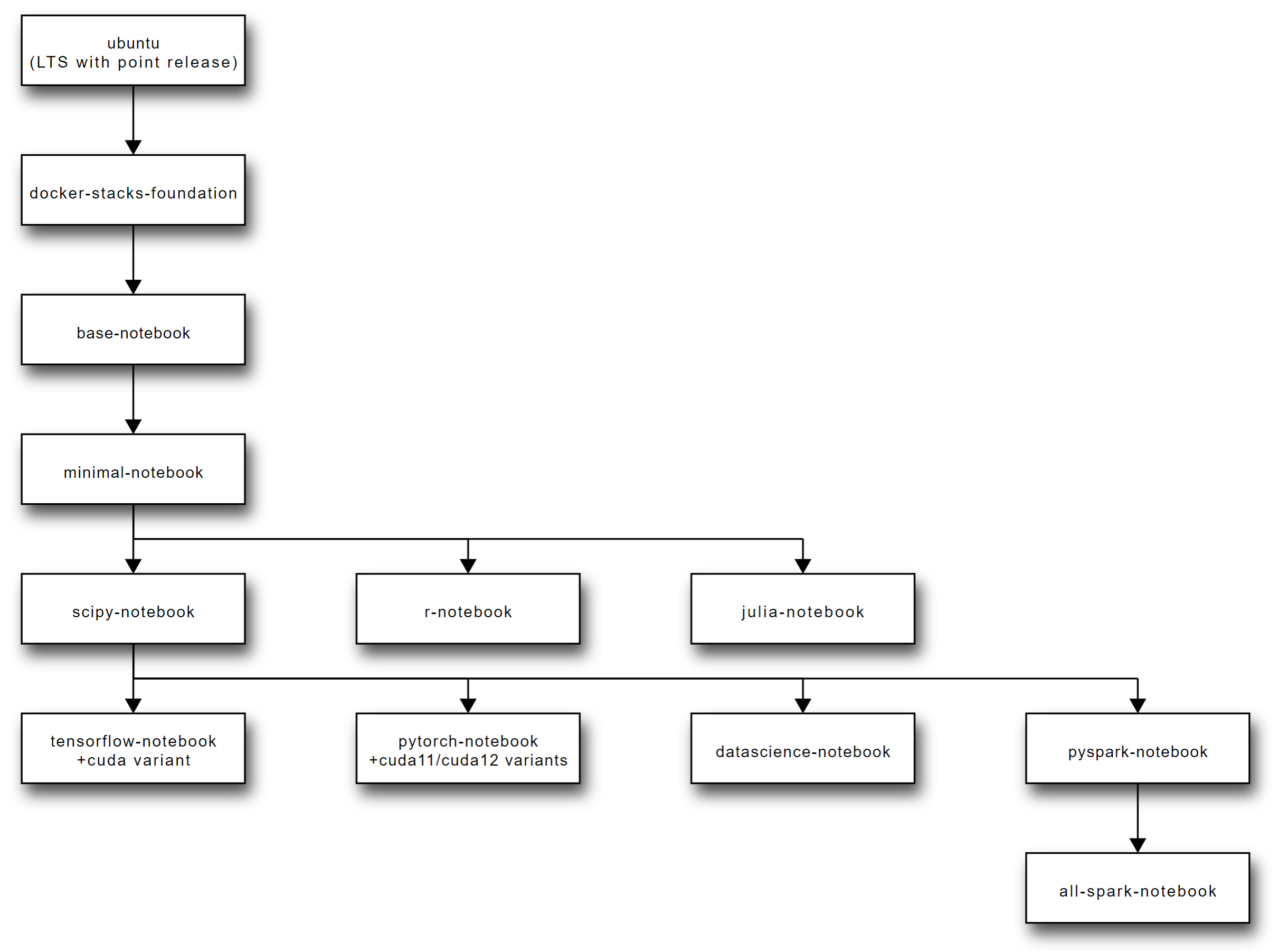
Jupyter Docker Stacks are ready-to-run Docker images containing Jupyter and related applications.

Jetstream2: Cloud platform for researchers

  • What is ACCESS?
    • ACCESS is a NSF funded, unified portal for researchers to access multiple cyberinfrastructure resources.
    • Starting point to request and manage allocation for computational, storage, and network resources.
    • Resources are available to any US based researcher or educator.
  • What is Jetstream2?
    • Jetstream2 is a user-friendly cloud computing environment.
    • Provides CPU, GPU, and large memory virtual machines.

Running Containers in VM on Cloud Platforms
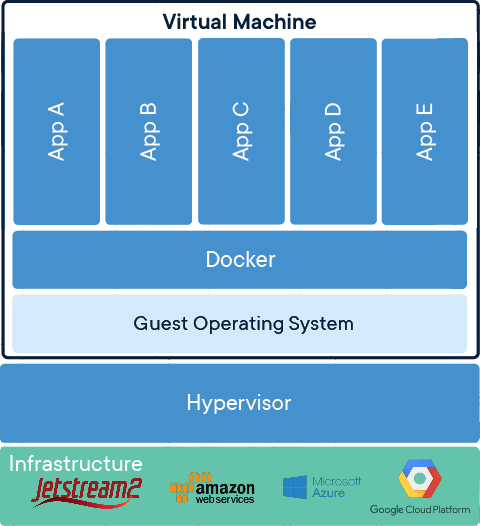
Virtual machine running containerized applications

Sounds Great! How do I get started?

In practice, using containers directly is difficult.

  • Containers are managed by command line interface (CLI).
  • CLI is difficult to use for beginners.
  • And cumbersome to use everyday.

Visual Studio Code (VS Code) can simplify remote computing usage!

 

Development Containers in Visual Studio Code

Beyond code editing, VS Code has features that helps.

  • VS Code is a popular code editor.
  • Available for Windows, MacOS, and Linux.
  • Tons of extensions (e.g., Python, R, etc.).
  • Remote SSH extension (e.g., connect to remote host).
  • Allow remote research computing with local experience.

Development containers with VS Code simplify container management.

Diagram of development containers on VM

Linux Host can be a local or remote virtual machine on a cloud platform.
Project Files represent your own project files.
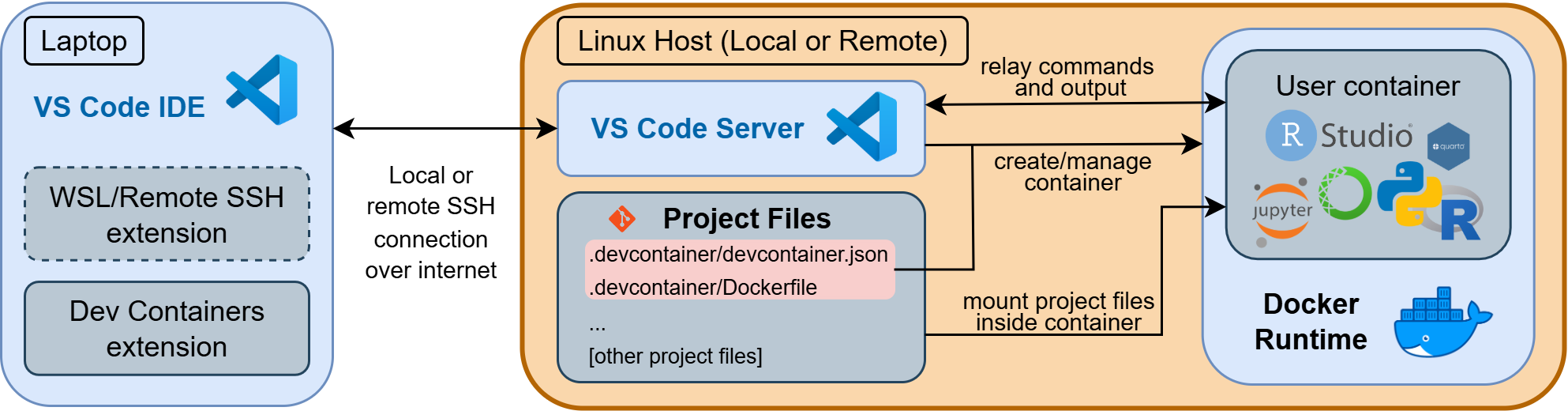
Development containers diagram

GitHub Codespaces is a cloud-hosted development containers platform.

Example: GitHub Codespaces
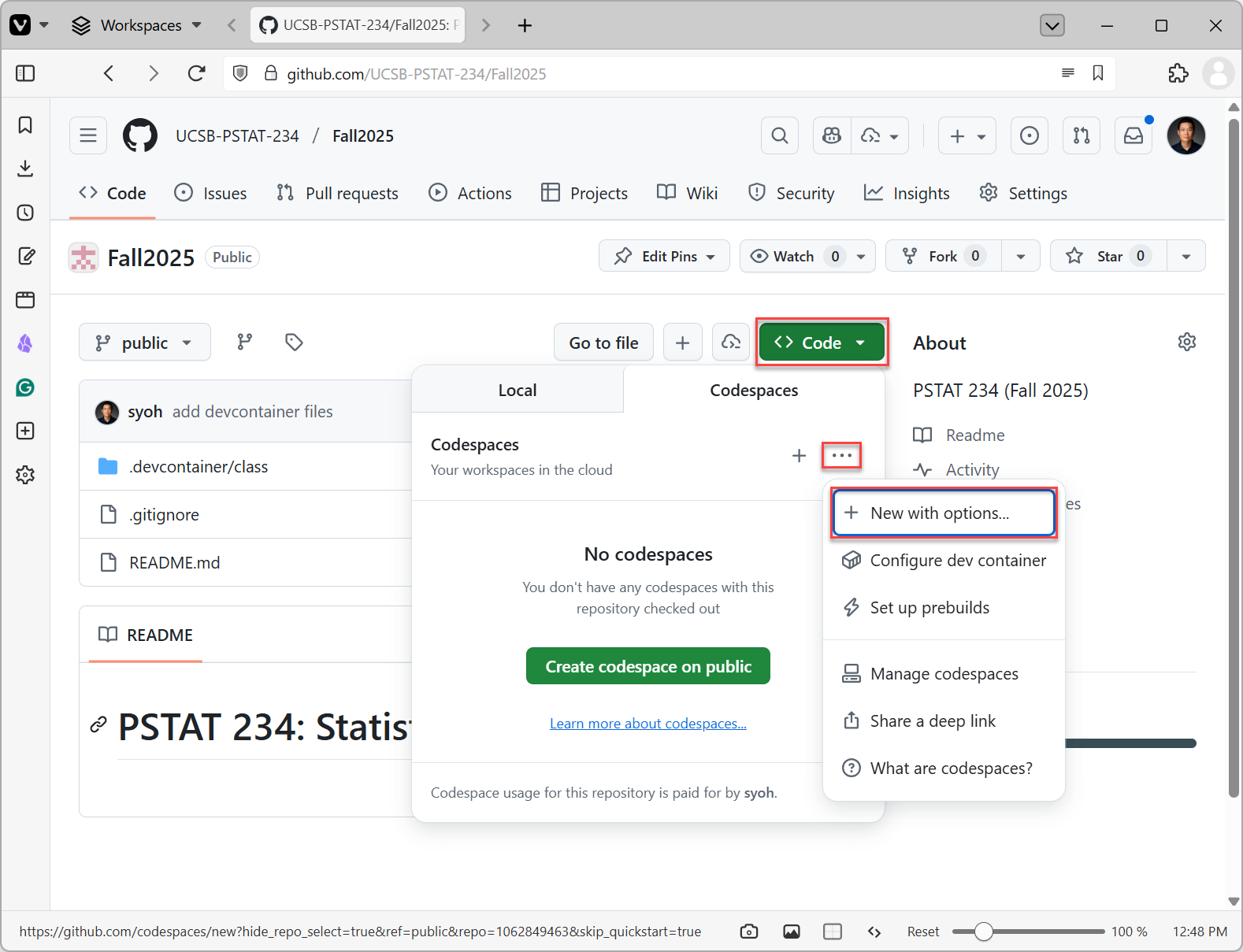
GitHub Codespaces Options

Example: GitHub Codespaces
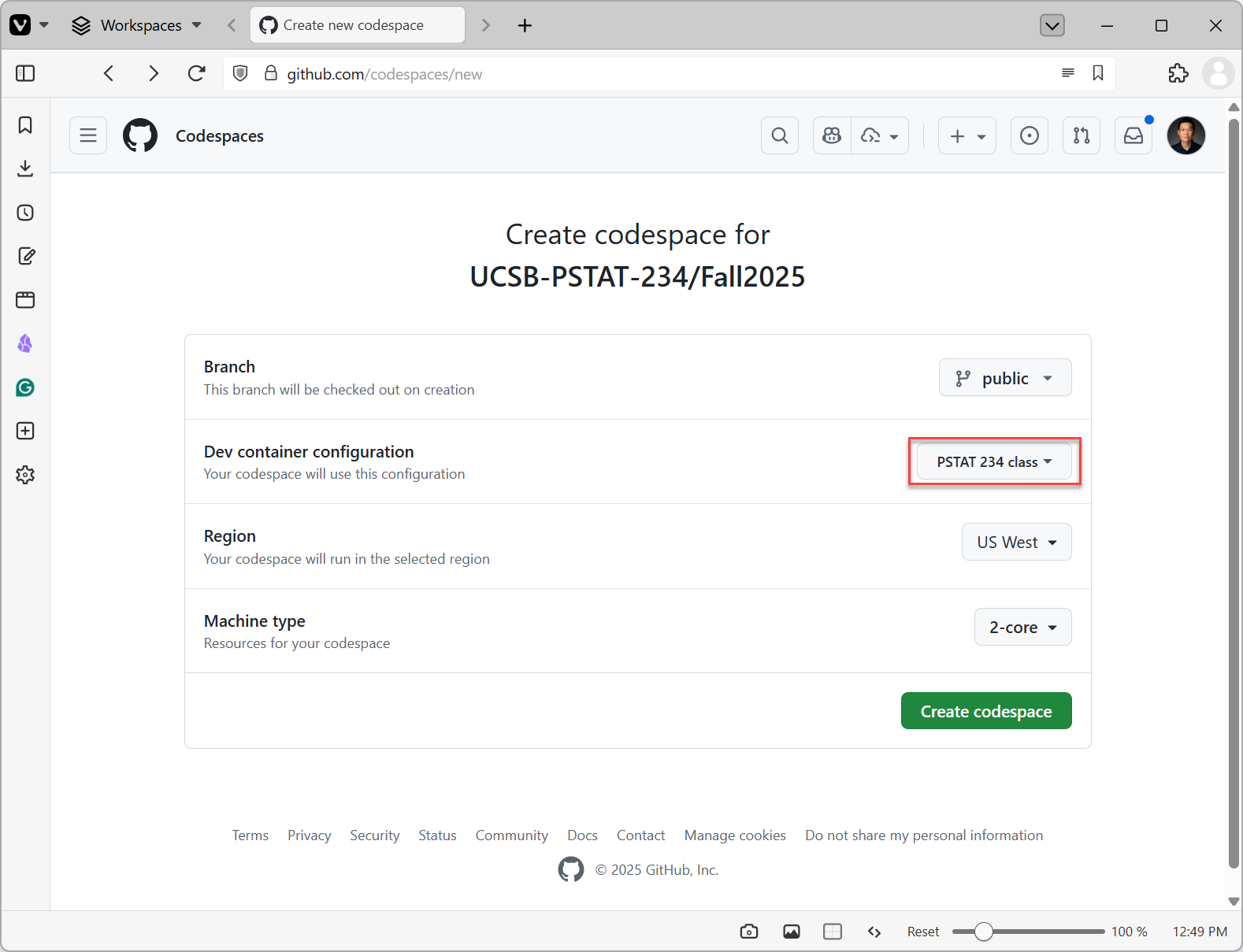
GitHub Codespaces Create

Example: GitHub Codespaces
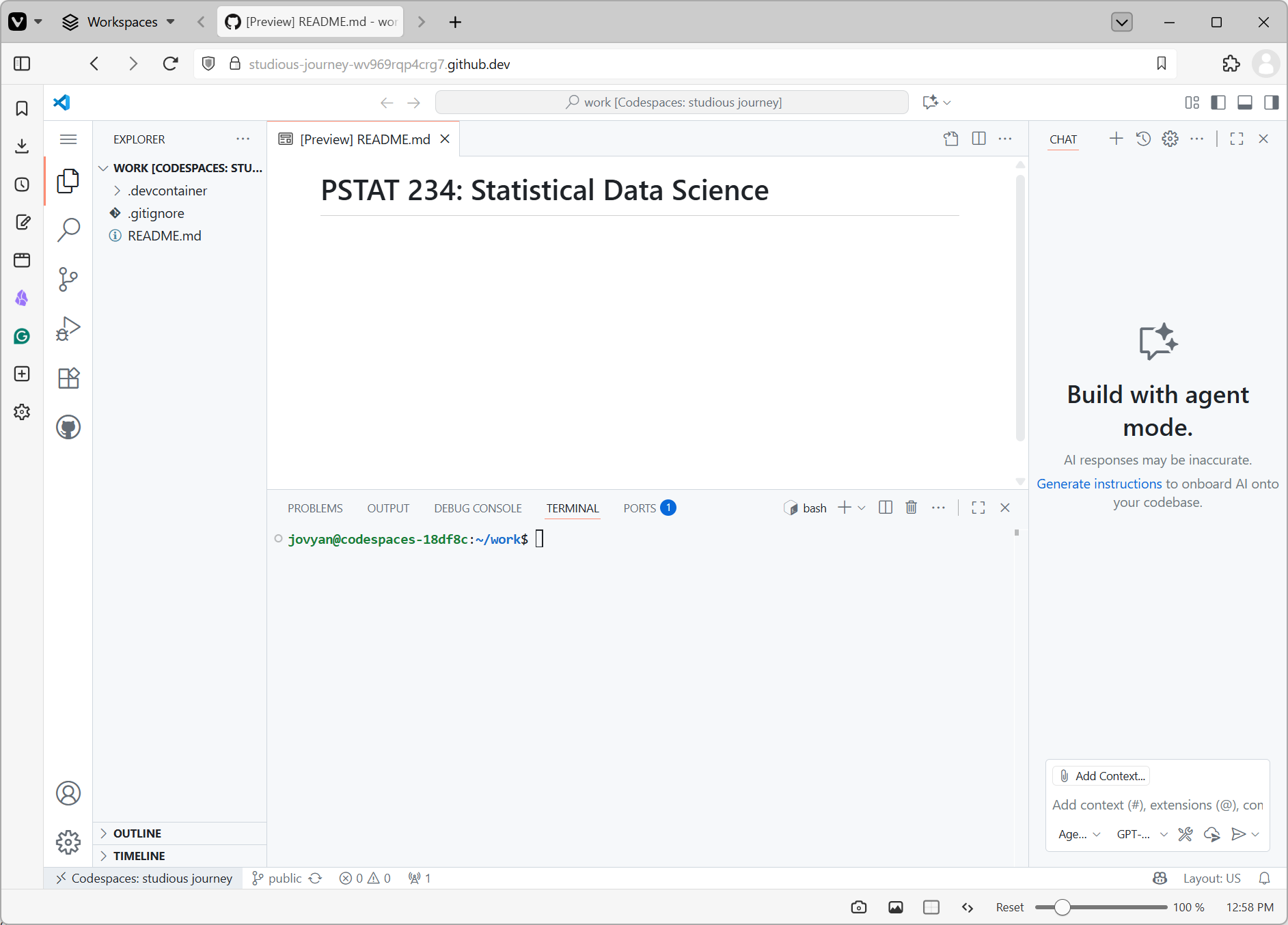
GitHub Codespaces User Interface

For Next Week

Assignments due next week (details on Canvas and Syllabus):

  • Join DataCamp group for this class
  • DataCamp exercises: Intro to Shell and Intro to Docker
  • Create your ACCESS account
  • Create your GitHub Student Pack account
  • Fill out the course accounts form

Also:

  • Install VS Code on your laptop
  • Bring your laptop to class next week

References

Baker, Monya. 2016. “1,500 Scientists Lift the Lid on Reproducibility.” Nature 533 (7604): 452–54. https://doi.org/10.1038/533452a.
Beaulieu-Jones, Brett K., and Casey S. Greene. 2017. “Reproducibility of Computational Workflows Is Automated Using Continuous Analysis.” Nature Biotechnology 35 (4): 342–46. https://doi.org/10.1038/nbt.3780.
Crane, Matt. 2018. “Questionable Answers in Question Answering Research: Reproducibility and Variability of Published Results.” Transactions of the Association for Computational Linguistics 6 (December): 241–52. https://doi.org/10.1162/tacl_a_00018.
National Academies of Sciences, Committee on Reproducibility and Replicability in Science, Board on Behavioral, Cognitive, and Sensory Sciences, Committee on National Statistics, Division of Behavioral and Social Sciences and Education, Nuclear and Radiation Studies Board, Division on Earth and Life Studies, et al. 2019. Reproducibility and Replicability in Science. Washington, D.C.: National Academies Press. https://doi.org/10.17226/25303.
Pineau, Joelle. 2018. “Reproducible, Reusable, and Robust Reinforcement Learning.” In Advances in Neural Information Processing Systems.
Steeves, Vicky. 2017. “Reproducibility Librarianship.” Collaborative Librarianship 9 (2).