Development Containers in Visual Studio Code
PSTAT 234 (Fall 2025)
Sang-Yun Oh
University of California, Santa Barbara
Development Containers Basics
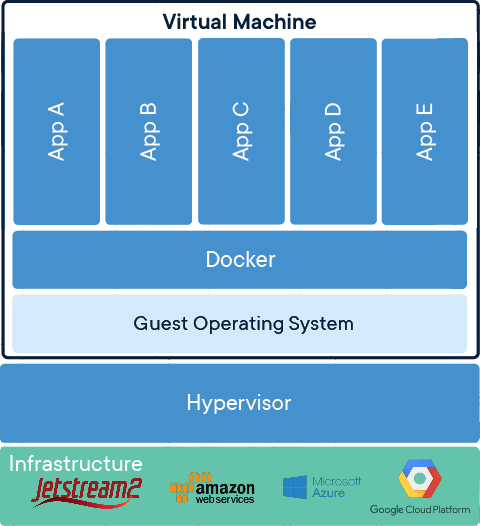
- Jetstream2 virtual machine (JS2VM) instance performs all your work.
- JS2VM runs Docker engine on Ubuntu Linux OS
- Docker builds/runs containers.
- Container has all software and libraries you need.
- Development container configuration is in
.devcontainer/devcontainer.json - Container definition is in
.devcontainer/Containerfile(orDockerfile)
Devcontainer on Remote Host (Jetstream2 VM)
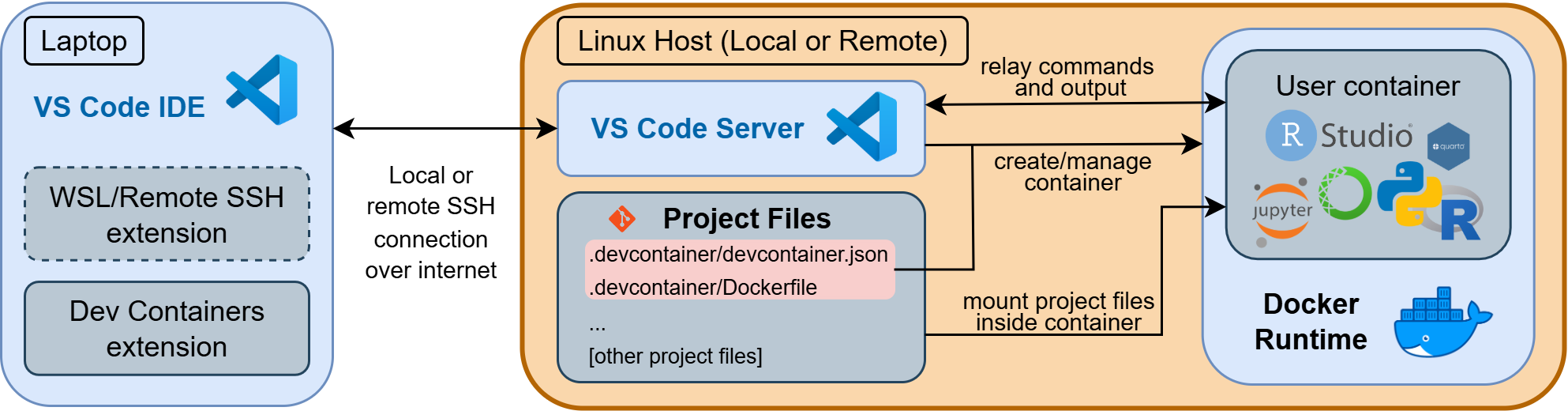
Can you explain the diagram above?
Filesystems and Files for Development Containers
Jetstream2 VM Filesystem
Working with Files
Assume project files are in /home/exouser/my-project/ on JS2VM and mounted to /home/jovyan/work/ in the container,
- Changes to files in
/home/jovyan/work/in the container are reflected in/home/exouser/my-project/on JS2VM, and vice versa. - File
/home/exouser/my-project/README.mdon JS2VM and/home/jovyan/work/README.mdin the container are the same file. - You can edit files in either JS2VM or the container.
- Other than this mounted directory, container filesystem is ephemeral.
- JS2VM filesystem is persistent unless VM is deleted.
Container Filesystem is Ephemeral
In general, container filesystem is ephemeral. Other than files mounted from a persistent storage, changes to other files in the container are lost when the container is rebuilt or deleted.
Modifying Container Image
DockerfileorContainerfiledefines the container image.- Editing
.devcontainer/Dockerfilechanges container image definition. - Rebuilding the container image applies the changes to your container.
- Rebuilding the container does not affect files in persistent storage.
- Modify system software, python/R packages, OS configuration, etc.
References
- Dockerfile reference on Turing Way (Community 2022)
- Ten Simple Rules for Writing Dockerfiles for Reproducible Data Science (Nüst et al. 2020)
- PSTAT documentation
Modifying Devcontainer Configuration
.devcontainer/devcontainer.jsondefines the container configuration.- Editing
.devcontainer/devcontainer.jsonchanges container configuration. - Rebuilding the container applies the changes to your container.
- Modify how container is built, run, and configured.
- VS Code extensions, settings, and other configurations.
References
- Development Container Specification
- Ten Simple Rules for Writing Dockerfiles for Reproducible Data Science (Nüst et al. 2020)
Container Image Examples
| Container URL | REGISTRY |
NAMESPACE |
IMAGE_NAME |
TAG |
|---|---|---|---|---|
docker.io/ubuntu:22.04 |
docker.io |
library |
ubuntu |
22.04 |
docker.io/intel/oneapi:latest |
docker.io |
intel |
oneapi |
latest |
quay.io/jupyter/r-notebook:r-4.4.2 |
quay.io |
jupyter |
r-notebook |
r-4.4.2 |
nvcr.io/nvidia/pytorch:24.12-py3 |
nvcr.io |
nvidia |
pytorch |
24.12-py3 |
Tutorials on Development Containers Usage
- Basic commands for starting/stopping/detaching/stopping containers
- Moving files around and working with files on GitHub repository
- Job management and running long jobs
Exercises
- Install
tmuxby modifyingDockerfileand rebuild the container. - Change the
FROMimage to another Jupyter Docker Image
GitHub Copilot
GitHub Copilot can assist you in writing and modifying your development container configuration files. You can use it to:
- Generate boilerplate code for your
Containerfileordevcontainer.json. - Get suggestions for VS Code extensions to include in your development container.
- Find and fix issues in your configuration files.
References
Community, The Turing Way. 2022. “The Turing Way: A Handbook for Reproducible, Ethical and Collaborative Research.” Zenodo. https://doi.org/10.5281/ZENODO.7625728.
Nüst, Daniel, Vanessa Sochat, Ben Marwick, Stephen J. Eglen, Tim Head, Tony Hirst, and Benjamin D. Evans. 2020. “Ten Simple Rules for Writing Dockerfiles for Reproducible Data Science.” Edited by Scott Markel. PLOS Computational Biology 16 (11): e1008316. https://doi.org/10.1371/journal.pcbi.1008316.